


RoadVision Dash Camera · WW
ROAD SAFETY DASH CAMERA

ROADVISION dash camera

HD incident recording for driving and parked vehicles
RoadVision — HD incident recording for driving and parked vehicles

RoadVision is a compact dash camera for recording journeys and keeping watch around a parked vehicle. It brings together HD video, a 170° lens, G-Sensor incident protection, parking mode and a built-in LCD.

  • ✓Ultra-wide 170° road view
  • ✓G-Sensor locks impact footage
  • ✓Parking mode responds to motion or impact
ONLINE SPECIAL OFFER
Special Offer
Review the current offer terms on the destination page.
ROAD VISION dash camera
ROADVISION AVAILABILITY

Check RoadVision availability

Use the link for your market to review current offer details and ordering information.

ONLINE SPECIAL OFFER
Special Offer
Review the current offer terms on the destination page.
ROAD VISION dash camera
PRODUCT OVERVIEW

RoadVision at a glance Everyday dash camera for road recording

RoadVision is a compact dashboard camera made to capture activity around your vehicle while you are on the road. The supplied product materials list HD video recording, a built-in LCD screen and a discreet body intended for regular windshield use.

A 170° ultra-wide lens covers a broad portion of the road and extends the view toward the sides of the vehicle. This wider framing can keep extra visual context around lane changes, nearby traffic and other moments you may want to review later.

The integrated G-Sensor responds to abrupt braking, swerving or collisions and protects the active video clip from routine overwriting. That helps keep footage tied to an impact or sudden driving event available for later review.

Parking mode is described as responding when motion or an impact is detected near the parked vehicle. When triggered, RoadVision begins recording the event so activity around the unattended vehicle can be documented.

For setup, the suction-cup mount attaches to the windshield and the camera connects to vehicle power. The built-in LCD provides access to settings and recorded clips, while the rotating mount helps you aim the lens.

RoadVision — RoadVision at a glance
HOW IT WORKS

Recording that responds to road events Capture, protect and revisit key footage

RoadVision records HD video through its wide-angle lens while in use. If the G-Sensor detects a sudden event, the current clip is protected from routine overwriting; parking mode can also begin recording when motion or impact is detected around a parked vehicle.

Wide-angle recording
The 170° lens captures a broad view of the road and surrounding traffic.
Impact-sensitive clip protection
The G-Sensor identifies abrupt movement and locks the current video clip.
HOW TO USE

Get RoadVision ready in three steps Mount, connect and begin recording
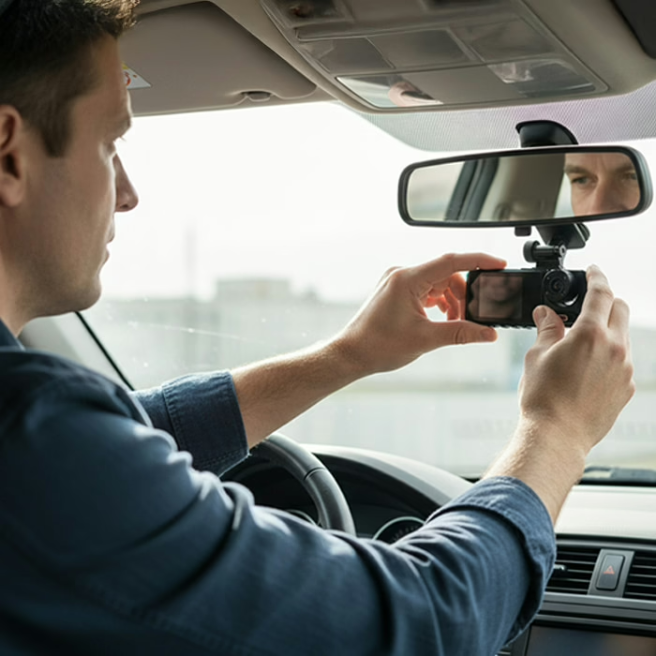
1
Mount RoadVision
Attach the suction-cup holder to the windshield without blocking the driver’s view.
2
Connect the power
Plug the power cable into RoadVision and connect the other end to the vehicle power port.
3
Adjust and record
Use the LCD screen to set preferences, aim the camera and begin recording.
RoadVision — Get RoadVision ready in three steps
FEATURES & BENEFITS

RoadVision tools for everyday driving Practical recording and monitoring features

✓
170° ultra-wide field of view
✓
HD recording in bright and low-light conditions
✓
Built-in G-Sensor for protected incident clips
✓
Motion/impact-triggered parking mode
✓
Built-in LCD for settings and playback
✓
Rotating stand, compact design and USB-C power delivery
PRODUCT DETAILS

RoadVision hardware at a glance Features confirmed by the supplied product source

The supplied source confirms the features listed below. It does not include a complete technical sheet for storage capacity, sensor resolution, battery specifications or memory-card limits, so those details are not stated here.

170° Lens
Ultra-wide viewing angle intended to capture a broad road scene.
G-Sensor
Detects sudden acceleration, braking, swerving or collision events and protects the active clip.
Built-In LCD
On-device display for navigating settings and viewing recorded footage.
Mount & Power
Suction-cup windshield mounting, rotating stand and USB-C power delivery are described by the source.
FAQ

Common questions about RoadVision Setup, recording and parking mode

How do I install RoadVision in my vehicle?
Attach the included suction-cup mount to the windshield, position the lens for a clear road view, connect power and use the LCD to adjust settings.
How does RoadVision handle low-light conditions?
The supplied product information describes improved low-light performance and HD recording intended to preserve visible road details in dim or night driving.
How does parking mode work?
Parking mode is described as monitoring for motion or impact while the vehicle is parked and beginning a recording when an event is detected.
Can I view footage directly on the dash camera?
Yes. RoadVision has a built-in LCD screen for reviewing recorded footage and navigating device settings.
What does the G-Sensor do?
It detects sudden acceleration, braking, swerving or collisions and locks the current video clip so the event is protected from normal overwriting.
How wide is the camera view?
RoadVision is described with an ultra-wide 170° lens designed to capture a broad view of the road and nearby traffic.
How is RoadVision powered?
The setup instructions say to connect the camera power cable to the vehicle’s power port; the product source also lists USB-C power delivery.
ROADVISION AVAILABILITY

Check RoadVision availability

Use the link for your market to review current offer details and ordering information.

ONLINE SPECIAL OFFER
Special Offer
Review the current offer terms on the destination page.
ROAD VISION dash camera
RoadVisionCheck regional availability
Check Availability →
Cookies

We don't ask for personal details here. Cookies and analytics measure visits and navigation.

Privacy policy